Moodle Customization Guides After Default Installation
Setelah Install Moodle:
- Fitur Panduan :- Merubah Favicon
- Menghapus Attribute Footer
- Self registration Tanpa Konfirmasi Email
- Disable View Online User
- Assign Admin Atau Creator Baru
- Menghapus Forgot Password
- Setup NoEmailEver
Change Favicon
$ cd /var/www/moodle #path moodle
$ find ./ -name *.ico
./theme/boost/pix/favicon.ico #you can change this icon
./theme/classic/pix/favicon.ico #you can change this icon
$ chown -R www-data:www-data ./moodle/
Menghapus Attribute Footer
$ nano ./theme/boost/templates/footer.mustache
#edit with your heart
Self registration Tanpa Konfirmasi Email
$ chown -R www-data:www-data /var/www/moodle/ #make moodle writable plugin
#download onlineconfirm.zip : https://github.com/strongpapazola/moodle_custom_default/raw/master/onlineconfirm.zip
!!! for registration confirm with admin, download :https://github.com/strongpapazola/moodle_custom_default/raw/master/auth_emailadmin_moodle37_2019072300.zip
#go to your moodle, Site administration -> plugin -> install plugin
#drag plugin after downloaded and install
#then setup self reg on : administration -> plugin -> Authentication -> Manage authentication
 - disable Email-based self-registration
 - enable Online Confirm
#save
Disable View Online User
#go to Site Admin > Plugins > Blocks > Manage Blocks and hide it there.
Assign Admin Atau Creator Baru
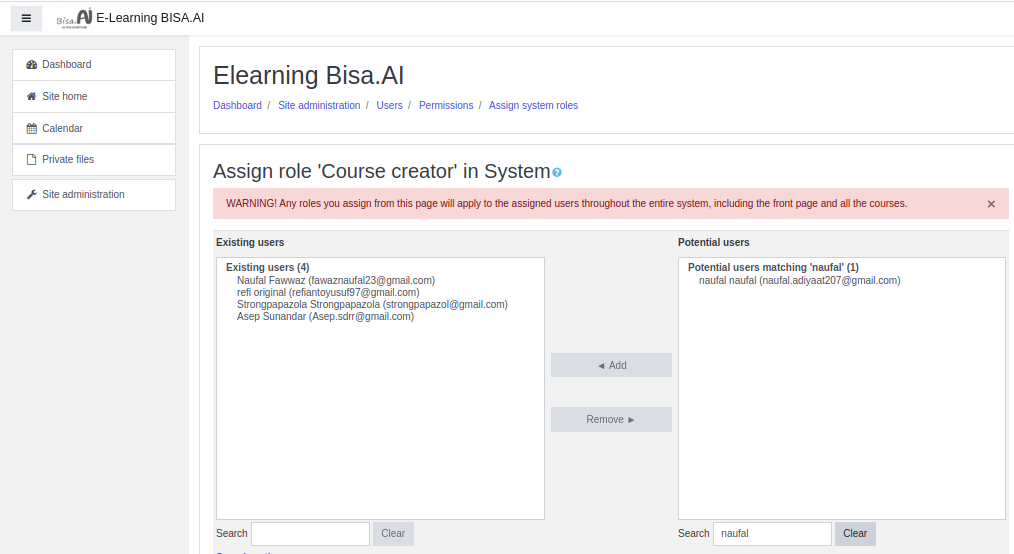
#just follow the img
Menghapus Forgot Password
Edit this file

to :

Setup NoEmailEver
# noemaileve setupedit /< moodle_dir >/config.php


Komentar
Posting Komentar